All features
Built for the messy reality of family life.
A detailed walk through every feature in Orinn, what it does, and the design choices behind it. If you've read the homepage and want the long version, you're in the right place.
Live map
Everyone, on one map you can trust.
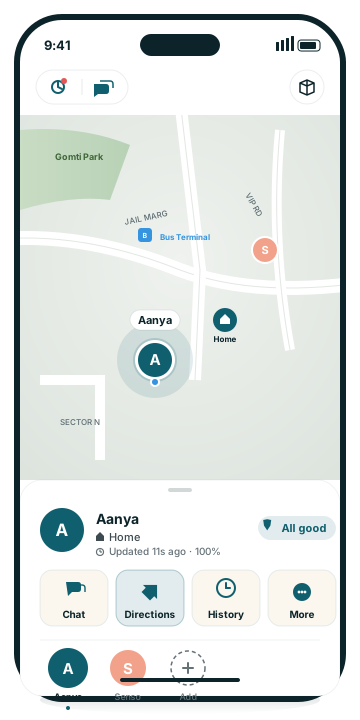
The home tab. Each kid is a circular avatar pinned at their current location. Tap a pin to focus the camera and start a 5-minute "watch live" session — the app polls their phone every 30 seconds for fresh fixes, perfect for "are they almost home?" moments. Tap again to stop.
The pin shows a translucent ring around it representing the location's accuracy radius. A 10-meter ring means we're confident; a 60-meter ring means they're somewhere in this block. We surface the uncertainty rather than pretend it doesn't exist.
The bottom sheet lists every kid as a card with their name, the place they're at (Home, School, an address), how recent the fix is, and battery percentage. Slide it up for more detail; slide it down to see the map full-screen.
Why we built it this way: Apple Maps and Find My both pin your location with a fake-precision dot — the same UI whether the fix is 5m or 200m off. Parents make different decisions based on accuracy, so we made it visible.
Saved places
A quiet ping when it matters.
Drop a pin on places you care about — Home, School, a friend's house, the rink — and give it a name and radius. When a kid arrives or leaves, every parent and caregiver gets a soft push notification ("Aanya just arrived at School").
The Free plan covers up to 5 saved places. Orinn+ removes the cap. Place names are private to your family — we never use them for analytics or recommendations.
Saved places also drive the "Currently at Home" / "Currently at School" labels you see on the map and in history. The radius is yours to set; we suggest 100m for a house, 200m for a school, 500m for an outdoor venue.
Trip tracking
Drives, walks, and rides — captured automatically.
When a kid moves between places, Orinn detects it and records the trip — start, end, route, distance, max speed, average speed. Driving, walking, and cycling are all recognized automatically (we use Apple's motion classifier, the same one Fitness uses).
Tap any trip in the history timeline for a dedicated detail view: the route on a full-screen map, a play button to replay the trip path, an inline speed sparkline, and a list of any harsh-driving events with their peak G-force and timestamp.
Harsh-driving detection (Orinn+) flags moments where the phone detected unusually hard braking or acceleration during a drive. We label them by tier — light jolt, hard brake, aggressive, severe — without trying to classify direction (front-vs-back) because that requires per-vehicle calibration we don't have. Useful for new drivers, useful for parents who want context, not surveillance.
What we don't do: we don't compare your kid's driving against other kids, give them a public score, or share the data with insurance companies. The events are shown to you and stay in your family.
SOS
One tap. Every parent. Now.
The kid's app has a big red SOS button (and a Home Screen widget for one-tap access without opening the app). When pressed, three things happen:
- Every parent and caregiver gets an immediate push notification with the kid's current location and a tap-to-call link.
- The kid's phone keeps sending high-accuracy location updates for the next 5 minutes so you can navigate to them in real time.
- The SOS event is logged in the family's Alerts feed for later review.
SOS is on the Free plan and we will never paywall it. Safety isn't a premium feature.
We also send the SOS via email backup if a parent's push notifications happen to be off — so the alert lands one way or another.
Watch Over Plus
Know when something about today is different.
You tap "Watch over" on a kid's card and pick where they're heading — School, Soccer, Grandma's. Orinn pulls a walking or driving route, shows it on your map, and follows the kid's live pin along the route. You get a notification if they take a different way, if they're running late, and when they arrive.
The clever bit: Orinn learns your kid's routine. After a couple of weeks, when 7:30 AM rolls around on a Monday, your app says "Aanya usually heads to School around now — tap to follow her there." One tap to start; you don't have to remember to do anything.
The pattern learning happens entirely on your device. Your kid's trip data never leaves your phone for routine inference — no cloud model, no server-side prediction, nothing trained on your family. It's stats, run locally, on data that's already in your hand.
What this is, what this isn't: Watch Over is built for everyday peace of mind — "they got to school on time," "they took the long way home today." It is not built as a kidnapping detector and we won't pretend it is. The right tool for that conversation is the police, not a phone app. Watch Over earns its keep by quietly catching the everyday signal you'd otherwise have to text to find out.
Walk Me Home Plus
For the moments they're walking alone.
Your kid taps "Walk Me Home" in their app and picks a destination. You get a push notification, the route appears on your map, and you'll see the kid's pin moving along the path in real time — with an ETA based on Apple's directions data.
You'll also get an alert if they go significantly off-route, stop too long, or reach the destination. The session auto-ends when they arrive (no awkward "are you home yet?" check-ins).
Designed to be initiated by the kid, not enforced by the parent. The point is "I want someone to know I'm walking, just in case" — not surveillance.
Messages New in 1.2
Talk to everyone — or just one.
One Messages inbox for every conversation: the family chat on top, then a private one-on-one thread with each member below it. "Charge your phone" goes just to the kid whose battery is low; "how did the appointment go?" goes just to Grandpa. Text and photos, timestamps, long-press to delete, unread badges — no stickers, no GIFs, no social-feed machinery.
When someone messages you, the notification arrives the way a real messaging app's does — the sender's photo on the banner, so you know who it is before you read a word. Other alerts (a speed event, an arrival) carry the member's photo too.
Messages live in the same private storage as your location data. We don't read them, scan them, or feed them to AI. Everyone can delete their own messages; parents can moderate any thread they're in.
Notifications New in 1.2
One card per kid — not ten pings.
Family location apps have a notification problem: a normal Tuesday generates "started a trip," "ended a trip," "arrived at school," "left school" — ten interruptions that teach you to ignore all of them, including the one that matters.
Orinn 1.2 fixes this on your Lock Screen. The first update of the day from each kid rings normally. Every routine update after that silently updates a single rolling card for that kid — "Emma: 7 updates today · latest: reached School" — replacing the previous one instead of stacking. One glanceable card per kid, always showing the latest, never a pile.
The important things ignore the digest entirely: an SOS, a fall alert, or a missed check-in always rings, every time. Quiet hours and school hours can silence the routine kinds on a schedule you set — and every notification carries the member's photo, so you know who it's about from across the room.
Grandparent care New in 1.2
The same calm, for your parents.
Invite an aging parent from Settings exactly like you'd invite a kid. Their Companion app switches to elder mode: the same big, simple screens, plus a medical card front and center. On your map they're a regular family member — same live location, history, trips, and alerts — with a heart badge and a care section on their member sheet.
Medical card. Blood type, allergies, conditions, medications with doses, doctor's contact, and emergency contacts. You can fill it in remotely as a caregiver; they can view and edit it themselves. A Medical ID widget puts the essentials on their Home and Lock Screen where a first responder can see them without unlocking anything.
Medication reminders. Set them from your phone; they ring on the grandparent's phone at the right times. The member sheet shows what's scheduled at a glance.
Gentle check-ins. Choose a daily window; if their phone goes quiet past it, the family hears about it. On a normal day, nobody has to do anything — that's the point.
Day history
A simple timeline of where the day went.
The History tab shows a kid's day as a numbered list of trips and stops, with a map of the day's route at the top. Tap a trip to drill into its details; tap a stop to see how long they were there.
The day-summary header gives you the at-a-glance read: "Aanya — Took 5 trips (12.0 km total) · 4h 45m at Home · max 70 km/h · 6 harsh events." Below that, scrollable stat tiles, then the timeline rows themselves with inline mini-maps for each trip.
The Free plan keeps 7 days of history. Orinn+ keeps a year, plus a weekly recap (see below).
What stays out: the timeline shows where they were, not what they did there. We don't pull data from other apps, we don't infer activities from sensors beyond walking-vs-driving classification, and we don't generate insights about their behavior.
Device health
Catch the "phone is the problem" before it's a worry.
Orinn watches for the things that quietly break tracking — location permission downgraded to "While Using", Background App Refresh turned off, push permission revoked, Low Power Mode chronically on, app uninstalled. When something needs attention, the kid's card flips to a "Heads up" or "Action needed" pill.
Tap the pill to open the health detail sheet — every issue is listed with a "Send fix link" button that pushes a deep link to the kid's phone, jumping them straight to the right Settings screen. No "go to Settings, tap Privacy, scroll to Location" instructions.
This is the difference between "they're not on the map" being scary and being a 30-second fix.
Weekly recap Plus
Sunday evening, a calm summary.
Every Sunday around 7pm, you get a push with a one-screen recap: total trips this week, time spent at primary places, a comparison vs last week, and any noteworthy events (a new place visited, an unusually late arrival).
It's designed to feel like a Sunday newspaper, not a notification deluge. Skim it, learn something, move on. Per-kid toggle if a teen wants to opt out of the parent's recap.
Privacy mode
A pause button that builds trust.
Your kid can enable "Privacy mode" for 30, 60, or 90-minute windows from their app. While active, you'll see a privacy badge on their pin instead of a precise location.
We think this is the right shape for parent-teen trust. The alternative — a kid who feels surveilled — leads to spoofing, leaving the phone at a friend's, or just turning the app off entirely. Honest privacy windows mean both sides know what's shared and when.
Coming with v2: parental override for safety scenarios. Privacy mode is for "leave me alone for an hour," not for hiding from a parent who needs to find them.
Widgets
A glance from the Home Screen.
The parent app ships with two widgets: a small one showing your most-recent kid's status and a medium one showing the whole family. Tap to open straight to that kid's view in the app.
The kid app has two too: an SOS widget for one-tap emergency without opening the app, and a Walk Me Home widget so they can start a session in a single press from the lock screen.
Elder members get one more: the Medical ID widget — blood type, allergies, and emergency contact on the Home or Lock Screen, readable without unlocking the phone.
Co-parents & caregivers Plus
For the family the way it actually works.
Generate a co-parent invite link from Settings; share it with your partner. They install Orinn, open the link, and they're added to your family with the same view you have. Each parent has their own account — you don't share a login.
Caregivers (grandparents, sitters, after-school coordinators) work the same way. Per-caregiver notification preferences let you decide who gets pinged for what. The Free plan supports 2 caregivers; Orinn+ removes the cap.
When a co-parent joins, every other parent gets a notification — no surprise additions to your family's data.
Ready to try Orinn?
Download Orinn from the App Store and try every Plus feature free for 30 days.